What it is for
DayPeek extends Apple Calendars and Reminders with a quick menu bar view. It helps you see what is next, complete reminders, and keep the day moving without opening another app.
Your day where you already look
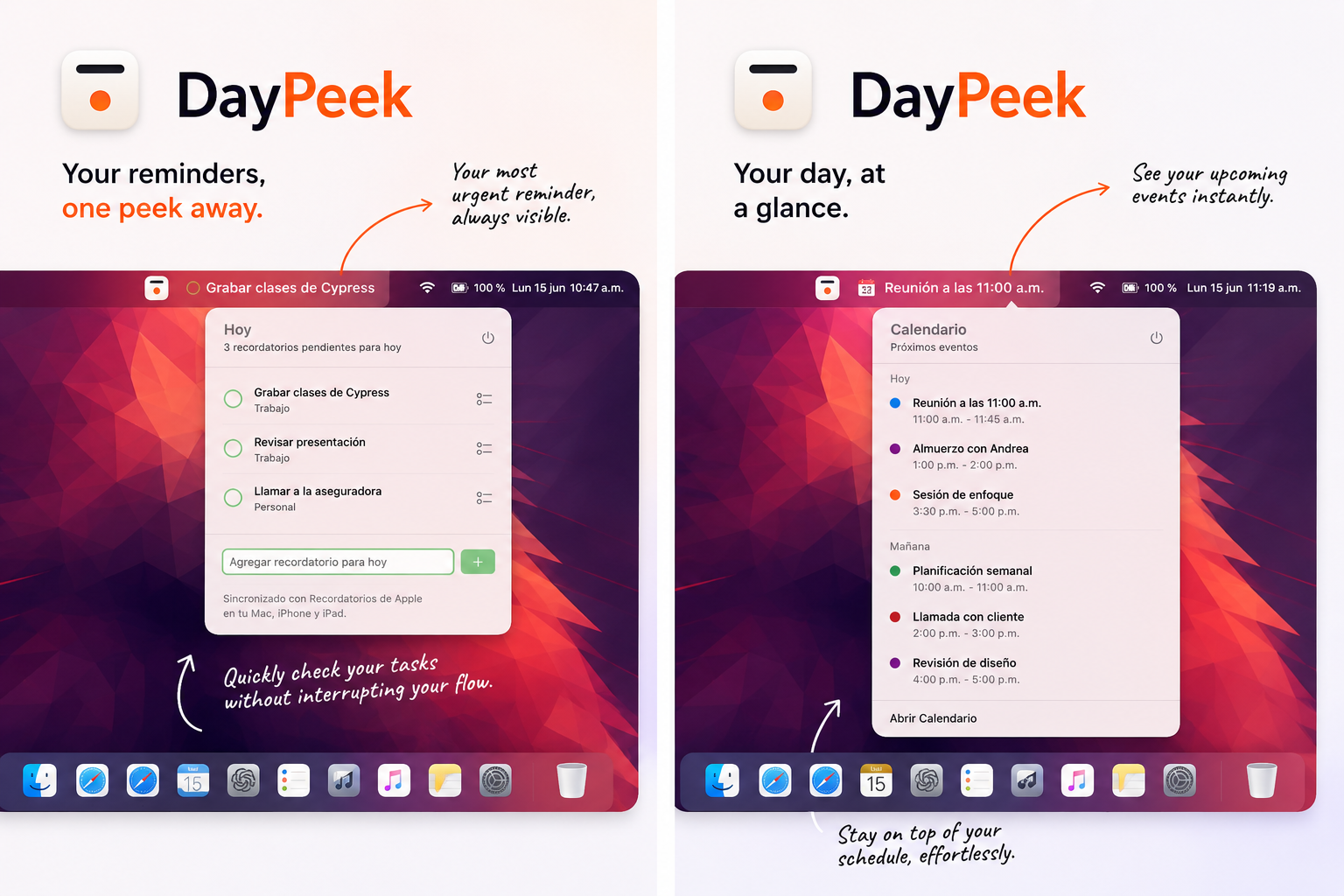
DayPeek lives in the menu bar so you can check what matters without switching spaces, opening a large window, or breaking your flow.
Visible reminders
The most important reminder stays close, alongside your list of pending items for today.
Upcoming events
Your meetings and calendar events appear in a compact view so you can understand what comes next.
Quick actions
Complete or add reminders for today directly from the menu bar.
How I recommend using it
DayPeek works best when your reminders already reflect your intention for the day. You do not need a complex system: just order what comes next.
- Arrange your reminders in the order you plan to do them, so DayPeek shows the next one you actually want to handle.
- Use Reminders for what reminders are really for: something you need to start or do yourself.
- Use Calendar for events that will happen at a specific time whether or not you initiate them.
- Use simple, actionable reminders instead of huge lists you will not want to look at later.
- When you finish everything for today, DayPeek shows what is coming tomorrow, so you can close the day with context without digging around.
Guides
How to use DayPeek to organize your day
Privacy
Capybarista privacy information lives in the Privacy Policy.